2017年11月27日 星期一

Judd Simantov on character rigging and modeling in Naughty Dog's The Last of Us _Judd Simantov 在頑皮狗的最後生存者裡,擔任角色綁定和模型製作。


Source from : Autodesk AT GDC 2013


Maya 與Max對照,Joint = Bone,Blend-shape = Morpher (skin morpher)


大家好,我叫Judd Simantov,我將談論有關最後生存者和角色綁定。

有兩個主要角色,喬爾(Joel)和艾莉(Ellie),他們是這次介紹重點。
自我簡介
  1. 頑皮狗TA Lead (秘境系列,最後生存者)
  2. 獨立承包商和顧問 - 顧客包含Naughty Dog, Blizzard Entertainment, Riot Games, Crytek, Sucker punch, Insomniac & Big Red Button
  3. 遊戲角色學院共同創辦人 

這邊有一些角色注意事項
  • 最後生存者有這樣一個強調敘述性特色,我們需要角色能夠真的可以支持它。
  • 我們想要將寫實性和細微變化盡可能推進到他們的動作中。
  • 即使雖然在PS3,我們想要挑戰技術和視覺極限。
首先,我們將討論臉,然後我們再討論身體。我認為臉確實是個相當有挑戰性的領域。對我們而言,要如何進步?這個對我們比較重要。

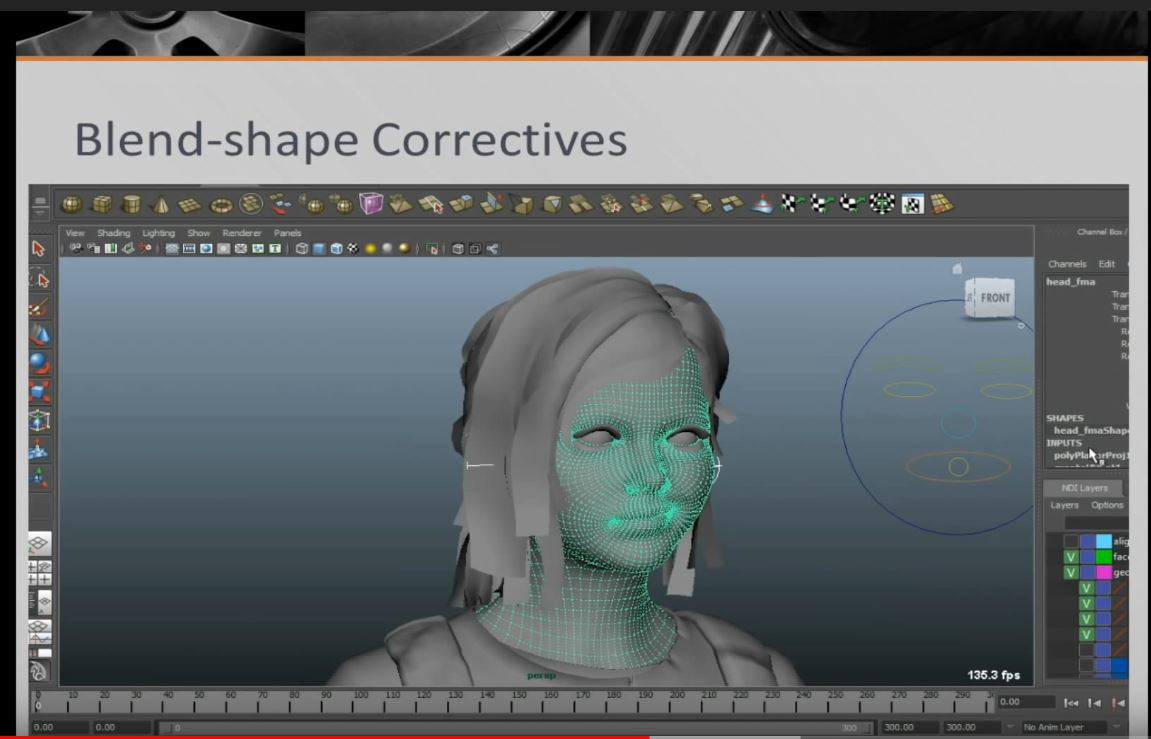
以Joint為基礎的臉部綁定,並用Blend-shape作為校正
以Joint綁定為基礎的臉部,我們會有一些Blend Shape (Morph Target)說明,我們可以深入探討。但最重要它的Joint 系統,是跟我們用在秘境系列一樣。我們是怎麼驅動Joint (drive the joint),有98個joint在臉上,這是相當多的數量,但這數量沒有比秘境2更多,最後生存者我們基本上只是優化擺放Joint和使用Joint的方法。我等一下會示範臉部運動,我們使用跟之前同樣的系統和工具。

在眼睛半闔以及嘴巴張開狀況下,綁定臉部。


  • 在眼睛皺褶上,可以比一般的Normal採樣效果更佳

在眼睛這個範圍裡,有個皺褶處,我們可以緩和許多拉扯,和在眼睛上許多變黑的部分。所以這樣一來,我們可以保持它半張開。當我們使用Normal Map,你會得到一個乾淨的眼睛(因為沒有拉扯和變黑),你會在影片中看到。我們在秘境2也做過展示,那時是有一個主要的問題,現在這個做法就幫助我們彌補它,這也讓我們可以保持更好的眼皮外型,因為我們不用從較遠的距離移動,如果我們是從較高的地方,把所有東西往下拉,才再製作一個型,這會是一個很大的負擔。有一些工作流程問題,你需要處理,類似確定眼睛張開不會有問題。因為任何人看到角色,不會就讓他輕易通過,跟你說YES,你可以進行下一步,這看起來很棒,醒醒吧,這不可能的。

基於更接近FACs的臉部

  • 基於更接近FACs的臉部
  • 定義一個以肌肉/解剖為基礎的方法

我們也試著基於臉部更接近FACs,就是一些你不熟悉的要素,它就是Facial Action Coding System (FACs) ,它把臉拆解成肌肉組,我們廣泛地使用它,而且它給我們更解剖式的方法去綁定,這對動畫師的確需要一點調適,不過一旦上手,我們就能讓角色讓人感覺是真實的。

著重在可以達到的極限
  • 從臉上感受到緊張感
  • 推進它的極限並保持角色外型
另外,我們會把表情推向極限,這對臉部有點難度,原本臉部只移動一點,但突然你要劇烈變化,準備表現出緊張,有件事你們看不到,我們有做wrinkle maps,讓皺紋透過表情出現。我們沒有放進來,不過遊戲裡面有置入,這幫助很大。但最大的挑戰,也是要把這些角色逼到極限並且角色模型不會變形,不會看起來變成另一個角色。對我們而言也是一個很棒的挑戰,我們真的要經歷不斷的調修。

這是一支喬爾的短片,一些東西,你可以看到他的臉,如何運動成表情

 有一些極限,我們試著讓每個表情讓它感覺不錯而且生動。喬爾舊的臉部Joint沒有Blend shape,我們達到的寫實程度,真的很驚人。

臉上有鬍子,也是一個很棒的挑戰,你可以看到模型密度,我們之後也會討論有多少模型在移動,這點很重要,可以看到很多遊戲,都在和它奮戰,或讓它感覺在臉上沒有關聯性,好像是獨立的物體,但我們希望它們可以一起移動並且感覺是有機的。


你可以看到有一些Joint如何移動。我會說臉部大概是最大的跳躍,是種藝術家級的跳躍,就是更容易了解的事情,把事情推向藝術面,而非任何新幻想的科技面向。


高面數

  • 允許在臉型上,有更多空間和皺褶。
  • 製作清楚的輪廓和形狀。
  • 給我們足夠的幾合面去雕刻校正。
高面數真的真的幫助很大,我意思是,你看到的確相當多的面數,但它提供給我們更多調整空間,所以你可以看到冷笑,你看到微笑,這部分有很多都會做得比較粗糙,因為他們沒有足夠的面數,我們試著讓每個角色都能達到。高面數也允許我們製作清楚的輪廓,像是當你看到角色,你不會覺得他是低面數的角色。我們會談論到有關這些校正,我們會雕刻到最好形狀,但這需要高面數才容易,因為你在低面數雕刻,它還是會造成問題。

這是一支短片,你可以近距離看到模型

我們會保持四角面。


高面數比較容易雕刻,形狀比較清楚,


可以看一下嘴形
試著讓模型做出這樣的極限。
瞳孔擴張

  • 我們追求一種些微的變化
我們還沒有看過在很棒的遊戲裡有瞳孔擴張,有趣的一點,這其實很容易設置。你可以看到瞳孔極限擴張,這有點詭異,當艾莉受到害怕的一瞬間,或她走到很暗的房間,她眼睛的反應會讓人感覺真實。

眼皮

  • 增加一個清楚跟隨眼球的眼皮
  • 當眼皮闔上,製作固定器將其固定。
基本上,我們之前我有說過我們有一些問題,我們不能保持我們的形,會產生一些暗部記號。我們希望眼球運動能夠非常平順,我等下就告訴你,還有你眨眼和移動眼球,保持清楚的形狀。

這是一個範例,你可以看到眼球好像在皮膚下移動。而且它都呈現清楚的形狀,沒有甚麼點是破掉的。
有個重要關鍵,它有固定的角度限制,我們花了很多時間確保她不管從哪個地方看,不管她怎麼眨眼,瞇眼,它都可以幫我們維持形狀。
動畫師不用再東補西補動畫瑕疵,這節省動畫師的時間。
Blend-Shape 校正
  • 使用Mudbox雕刻Blend-Shape校正
  • Joint有還原度的限制
  • 質量用Joint特別難成形
  • 增加工作流程的複雜程度。
我在講這之前,Blend-Shape校正,有許多名稱都在講它,但最基本的理念就是 : 你使用Joint去得到你80%的造型,而你沒辦法達到更進一步的層級,你可以雕刻Blend shape,額外加入(additive blend shape)。
我們用Mudbox,因為它容易輸出輸入(因為頑匹狗是用MAYA,Mudbox跟MAYA又很好的搭配)。很明顯使用Joint,還原度會受限制。
會增加一些複雜度到工作流程,因為你綁定結束後,製作Blend-shape校正,他們會將模型改變,你就要回頭再重做底層。 但最終結果是值得的。


我們有14張臉在艾莉身上,這真的是很酷的附加(addition)。 你可以只看一些變 形。

這全部的臉形都是附加物(additive),這意思是指,它是先用Joint綁定,再雕刻出來的臉型。所以它們看起來相當輕微變化。
但你看到它們混合之後,
當她瞇眼睛的時候

可以得到皺褶,
所以你只要有瞇眼睛的臉型,再combine它們(Maya用法),你會得到一個很cool的效果。
我現在要展示,我只是開關一些東西,
這是臉頰鼓起
這有點不是很明顯

你可能看不出來

我現在要展示微笑,如果我把Blende shape關掉,你會看到一些質量消失。Blend shape很微量,但它開始有了變化,會在一個範圍裡有一些質量產生。

現在是微笑,有一些摺皺,一些質量,得˙到一些嘴角,臉頰挺起,


我在展示一次,我把它關掉,打開。
很明顯它有不一樣,有一個很棒的輪廓。

Blened-shape 不支援巨大的變形,不過它已經給你足夠量去調整。
 我們也會用來重塑手肘,

我們做在臉上的東西,那些是比較大的改變,一些高規格的關鍵東西,我不會深入講到超級技術的細節。

我們現在來看身體

架設骨架

  • 身體有326根骨頭。
  • 85根runtime driven,這意思是指它不是被bake animation (類似有固定的動作),基本上是用driven key和constraints這樣的方式,在引擎中執行程序動作,使用處理器,不會消耗記憶體(no memory hits ) 。
  • 241根animation sampled Joint ,意指有bake animation。
  • 大多骨頭都被綁定。
有很多東西,但你看到我們有很多骨頭作單純的工作。

身體骨頭架設

  • 俐落joint對齊和排列
  • 更放鬆和中性

我們繼續看,在秘境結束後,我們有機會去改良一些事情,我們回頭看骨架設置,如何讓它更好,我們中和了一些姿勢,你可以看到他的脊椎(spine),我們真的讓脊椎柔軟,這很棒。我們盡量讓腿的骨頭直一點,但還是有一點小角度,讓IK裝上去,不容易翻車(pop)。角色模型盡量讓是放鬆姿勢,它對變形的效果更好,

手掌的腕骨Joints

  • 允許更動態的手勢和更具彈性

另外,我們在手掌上,增加兩倍的Joint,這之前我們沒用過,這讓我們可以重塑手掌,我這邊沒有例子,但你可以看影片,你可以看到手裡的Joint,它們如何影響皮膚,它的影響雖然小,但可以看出它的變化。

基本上 有三個joint,這是一個很棒的新增,我們可以得到更動態的手勢。


手臂移動控制器

  • 允許動畫師在手臂上塑出微量的改變

另外我們的移動控制器,我們利用Joint作旋轉(twisting) ,並將它們分散,不過我們從不把它曝光給動畫師。我們花太多時間試著取得完美的權重比例,為什麼不把這些控制器打開給他們用,如果移動太遠,它會看起來很怪。這些控制器只是基本的額外控制器,如果動畫師只是轉移,動畫師可以旋轉它,縮放它,或是修一些穿插。這樣就不用再回去重綁。


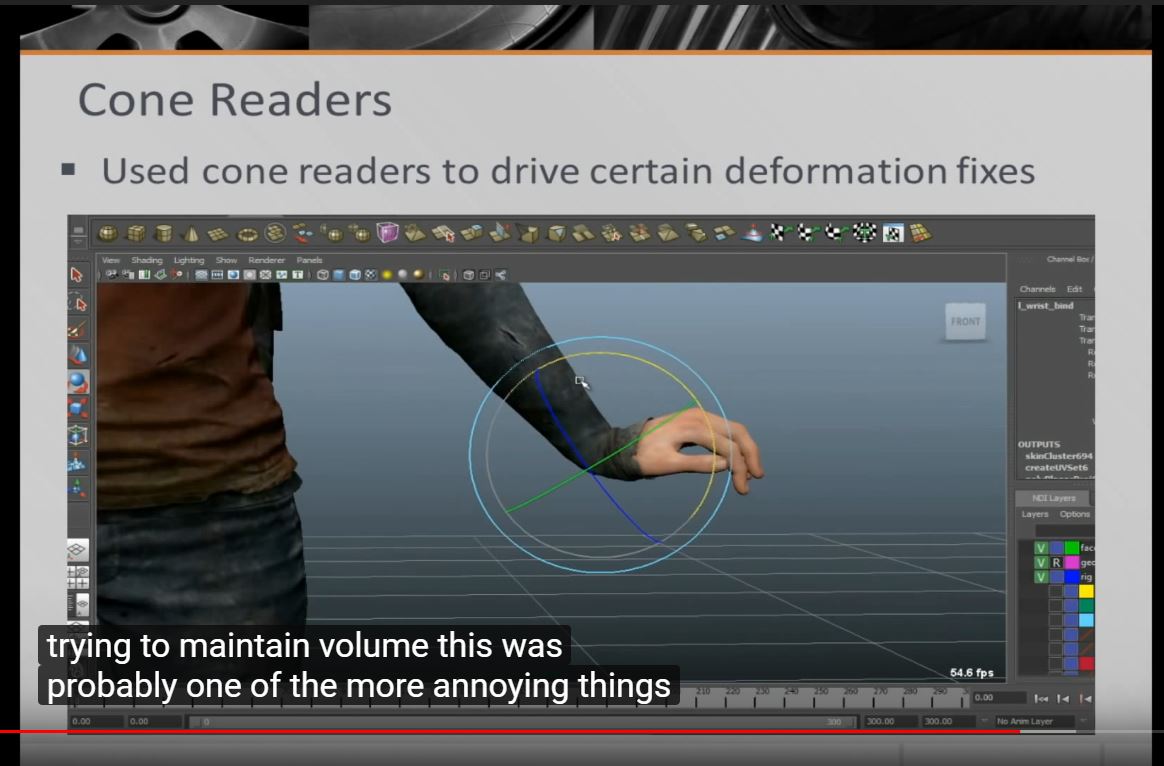
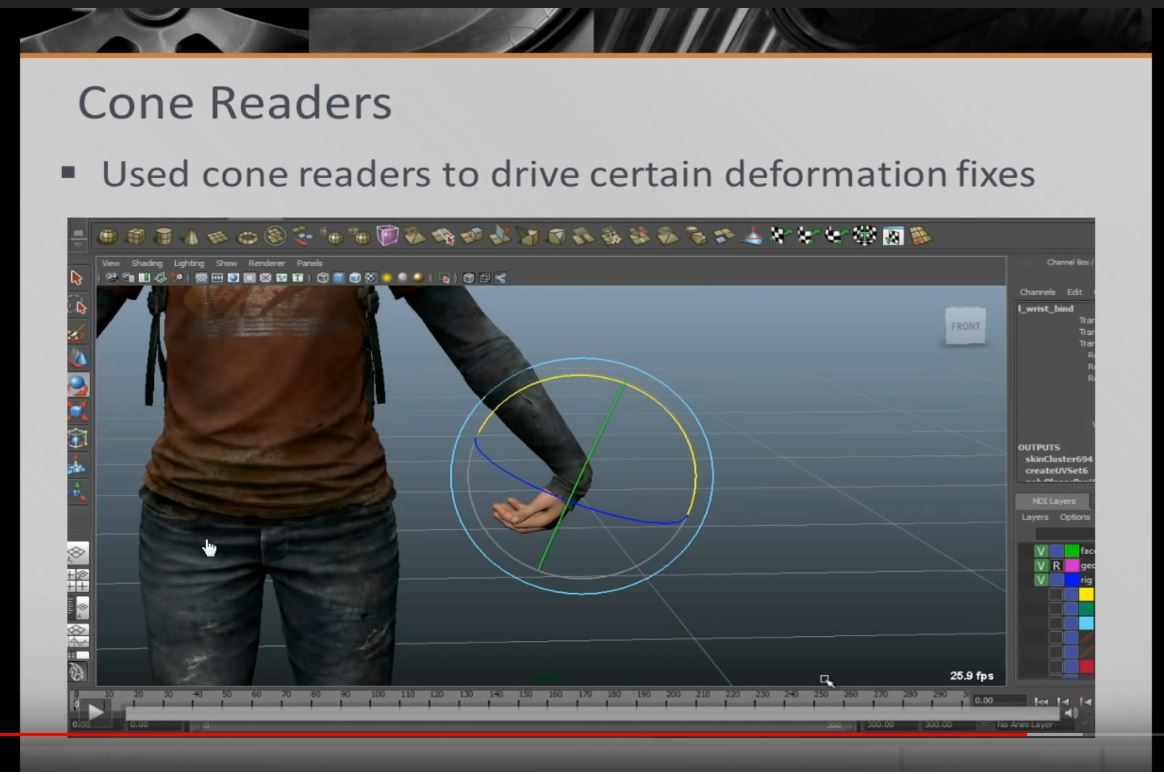
Cone Readers  (大多用在肩膀與手腕)
These readers are typically used in problem areas such as the shoulders and wrists to help prevent the geometry from collapsing and to keep the volume of the area the same. 
這些reader,一般被利用在解決解決肩膀與手腕的問題,幫助防止模型擠壓,和保持形狀的不變。

  • 利用Cone readers驅動某些變形去修飾
這些Cone在秘境的時候就有了,有位老兄Tyler,在頑匹狗擔任TD,使用這種setup。這個概念,就是我們使用這些Cone去驅動這些Joint,這3個Joint可以修正手腕變形,你看轉動可以驅動,但我們不是用set drive key的方式驅動,因為設不一樣的key,會讓你出。

所以我們讓這些Cone,你是輸入的量,它就會輸出量,它用這些量,去驅動並保持量體。


你可以看到它會修正手腕,試著保持形狀。
這可能是設定骨架中,最麻煩惱人的部分,但最後你想要保持形狀,你就必須要把每個角度都處理完,這才是長久之計。

"肌肉"系統

  • 即時"肌肉"外殼,突出的位置是基於接觸點的距離。
  • 允許我們不必使用contraints(限制)或外部軟體
在我們完成秘境2的時候,我們增加一件很酷的事情,同時我們秘境3也在進行,這時候有馬在秘境3之中,我們察覺我們需要肌肉系統。我那時有點沮喪,我們在秘境中,要做很多變形去修正一些地方。我就去寫類似肌肉系統的東西,它並非解剖式的準確,基本上這些肌肉外殼,你現在看到的影片,它只是依據距離凸起,在MAYA裡面這真的真的非常迅速,但不能在引擎運作,所以你要把Joint attach給這些肌肉外殼,讓它驅動,不用任何constraint或drive key,這部分也是比較麻煩的地方。


當你舉起肩膀,附近的Joint也會跟著位移,它有一個凸起的參數,它會自動保持整體的模型,這變得容易設定。我花了幾天的時間寫了這個外掛,有些肌肉系統要花很多工夫,我這個只抓大範圍區塊,它們會有動態調節,像是輕微移動,但它有時會有點過度移動。

旋轉分離外掛 (MAYA)

  • 一種允許分離及分配旋轉肩膀以下和前臂以上的方法。
  • 架設簡易和乾淨
  • 非常難出現翻船
這是一個完全不一樣的方法,你可以旋轉並分配twist給手臂,但這會花太多時間架設。我們有一個非統一的做法,我們只是想做一個簡易乾淨的架設,我們不想要太容易翻船,要保持模型正確位移。我寫這個外掛叫做twist dispersion,它是用Quaternion(四元數)寫的,基本上,分配twist,你可以得到很棒的旋轉(twist),你可以分配你想要它旋轉joint的量。


這些Joint都有用位移控制器,手腕上有一個訊息告訴你現在的轉量。
我們在前臂下最大的工夫就是,在畫手腕權重時,我們真的想要兩個骨頭彼此旋轉一樣,它們有點像鎖在一起,如解剖學的運動,你會感覺骨頭是圍繞另一跟骨頭旋轉。這就是美術面的範圍,而非技術面。你知道我們就是想逼到極限。
如果你轉360度,看旋轉數值就容易轉回。
使用即時helper處理衣服
這不是甚麼新技術,但我們用很多,我之前有講到程序化眼睛設定,設置driven key,在遊戲中運行,之前我們有很多問題,像是角色舉起他的腿,腿會穿插衣服,看起來很糟,所以我們想解決這問題。

所以它舉起腿到某點,它會舉起衣服,這其實有點左右為難(catch-22),如果你做太多,你獨立它會看起來很線性,像機器人,所以我們會微量使用它。


結論 :

  • 我們可以創造進行敘述的角色
  • 我們進化現有技術和工具。
  • 臉部是很棒的強化並且我們可以建立細微的情感影片
  • 身體變形器改善,但更重要是精簡架設。


感謝各位


2017年9月20日 星期三

Learn Fight Choreography (How to film fight scenes PART 3)__學習戰鬥編排(如何拍攝戰鬥場面 part 3 )

Learn Fight Choreography (How to film fight scenes PART 3)

學習戰鬥編排(如何拍攝戰鬥場面)

Welcome back to the “How to film a Fight Scene” series!

歡迎回到如何拍攝"戰鬥場景"系列 !
I am writing this series from my personal experiences in the action film industry, as I attempt to breakdown the science of how to make your own fight scene and learn fight choreography! If you missed it, make sure to read the first two parts to the series..

我正撰寫的這一系列文章,來自我個人在動作電影的經驗,我試著去分析如何自製戰鬥場面和學習戰鬥編排的科學。

Part 1 >> How to study Fight Scenes
Part 2 >> Learning basic Fight Moves
Tony Jaa fights Marrese Crump in this fight scene from the movie The Protector 2
Tony Jaa vs Marrese Crump in a fight scene from The Protector 2
Today we are going to be learning the “rules” and “tricks” to selling hits on camera, and finally filming a practice fight scene!

今天我們要學的是"規則"和"竅門",去呈現鏡頭上的痛擊(selling hits),並最後的拍攝練習戰鬥場景
While there are no real “rules” to any art, you will still want to practice the guidelines before you venture into breaking them.. here are a couple of the most common rules to keep in mind.

對於藝術沒有絕對的規則,你會想練習這些準則,在你冒險打破它們前,有一些最常見的規則要記住。
The 180 degree rule. This is the technique that is used to film dialogue scenes in films. Once you establish the geography of a scene and show the position of the characters, you want to make sure your camera doesn’t cross an invisible line which is formed by the interaction of two players.. so if Fighter 1 is on camera left (left side of the screen) and Fighter 2 is camera right, you want to make sure that whichever angles you choose will stay on one side of the “180 line”. (See the fancy diagram below)

180度線 這是一個技術,在電影中使用的電影語言,一旦你建立了一場戲的編排和顯示角色的位置,你想要確保攝影機不會跨越兩個角色互動之間的線,所以如果武師1在攝影機左邊(螢幕左邊)和武師在右邊,你想確保你選的角度是保持在180度線的位置上。(看下圖)
The 180 degree rule is an important thing to remember when filming fight choreography.
The way you can break this rule without jarring your audience is to either use a “cutaway” shot (show something completely different, then come back), or to have the “switch” happen all in one shot on the screen (ex, one of the fighters crosses camera to the other side of the screen, establishing his new position.)

有個可以破壞這個規則且不會混淆觀眾的方法,就是使用cutaway鏡頭(插入鏡頭:呈現完全不一樣的事物,再回到主線),或是"轉換"全部發生在同一顆鏡頭裡 (例:一名打者跨越鏡頭到螢幕另一邊,建立他新的位置)
Stacking your hits. This is the secret to selling your punches and kicks. Unless you are using specialized lenses, cameras can’t tell distances very well. This is the key to what lets us stack our hits. Let’s say you want to sell a punch to the face.. what you need to do is make sure the fighter’s fist crosses in front (or behind) the head at one point during the move, and the person getting hit reacts with the correct timing and in the correct direction. You can be up to a foot away and BAM, you have a solid hit.

堆疊你的打擊 這是展現你的拳擊和踢擊,除非你使用特別的鏡頭,攝影機沒辦法抓到距離。這是讓我們堆疊打擊的關鍵。假設你想展現在臉上貓一拳...那你就要確保武師的拳頭會移動到頭的正面或後面,而受擊者在正確時機回應,並在對的方向。
A punch which follows the stacking rule with a Jab to the face from the Walking Dead.
It will take you some practice getting used to all of the different possible angles you can sell a hit from, and the distance and timing required between both performers.. but if you study a lot of fight scenes, you will start thinking of the possibilities intuitively!

但如果你研究了很多戰鬥場面,你會開始直覺地思考可能性。

Playing with eye movement. Remember that we are putting on a show for the viewer. So it is important to keep in mind where their eyes are looking during your fight. If one character kicks the other on the right side of the screen and you decide to continue filming from another angle, try to keep the last action in around the same screen space to make it easier for your viewer’s mind to overlap.. this is something that you could play around with during editing, (adding in camera movement to match your movement in post) but that would benefit you immensely to keep in mind during filming. (Look at pic below for reference.)

玩弄視覺位移 記得我們給觀眾呈現一場表演,有件事一定要記住,他們在看你的戰鬥時,眼睛在看哪裡。如果角色在螢幕上踢向右邊,而你決定從另一個角度繼續拍,試著把上個動作的位置放在銀幕同一邊,可以讓觀眾容易適應。
Start filming with the last action when moving to a different take. If you’re filming a fight scene creatively, you will have the cutting points already settled in your head. When you’re actually on the set, make sure to overlap the last action at the beginning of each take. For example, you decided to switch angles right after someone got kicked in the face.. start the next take with the whole kick in the face again, that way you will have a nice, fluid cutting point.

從上一個動作開始拍攝  假設你決定踢完臉後角度換成右邊,那你下一個take就是從臉已經被踢的動作開始拍新的角度,這樣你就會有一個很棒的又流暢的剪接點。
Tony Jaa kicks Marrese Crump in The Protector 2, this is a good example of starting on the last action in order to get a good cutting point when filming a fight scene.
These 3 takes, filmed starting with the last action, flow well together.
And that’s all you need to know for basics! As soon as you get out there and start filming, you will start coming up with your own rules and tricks that are unique to your style. Don’t be afraid to play around! Remember, we’re just putting on a show :)


For the complete beginner, I will now walk you through the basic filming structure. This is a super safe way to film a fight with almost no creativity required on the camera-man’s part. I would only recommend this way of filming to beginners..it’s safe and you will get everything you need, but this will create A LOT of editing work.

對於完全新手,我要介紹你一個基本拍攝結構,這是一個超級安全的方法去拍攝戰鬥場面,不需要攝影師幫忙,我只推薦拍攝新手,它很安全,你可以得到你想要的,但這會有很多的剪輯工作。
– Film one or two MASTER SHOTS from a wide angle so you can see both fighters the entire time. Have them run through the fight a couple of times and try to catch each beat, but don’t stress over selling all of the hits from here.
– Film the fight over each fighter’s shoulder. This is where you want to try and make sure each hit sells.
– Film some CLOSE-UPS and INSERTS on hits that you weren’t able to catch in your other takes, and which you feel will help tell the story of your fight.

--用廣角鏡頭拍攝一到兩個主鏡頭,你可以看到整個對打,讓他們排演幾次,試著抓到彼此的節奏,但不需要把過度用力呈現出拳。

--使用過肩鏡頭。這是可以呈現出拳的地方。

--拍攝一些出拳的特寫和插入鏡頭,可以幫助你的戰鬥故事
Following this route, when you get to editing your fight scene you will have a choice of ~3 different ways to sell each hit. If you do have some creative ideas on how to film your fight, I would recommend you to film the vision in your head and only get the shots you need. That way you can see how it all goes together in the edit, and you won’t spend extra time filming stuff for safety (although I recommend filming a master shot in any case).

依照這些規則,當你剪接你的戰鬥場景,你會有許多個不一樣的選擇,如果你真的有一些不一樣的創意,去處理你的戰鬥,我會建議你在你的腦袋先拍過,然後只取你要的鏡頭。這樣你就可以再剪接裡看到他是怎麼運作,你不會付出額外的時間拍攝 (雖然我建議在任何專案都要拍攝主鏡頭)
“This is how I used to film fights when I first started. It helped me dial in my performances and movement, but my personal style soon outgrew the ‘safe’ way in favor of telling each story in a different way..”

With today’s availability of cameras, you shouldn’t have anything stopping you! Grab a friend, get out there, and film your first practice fight scene! Aim for 12-20 beats, filming 3-7 beats per take. Any camera will do (even your cell phone camera today is better than the camcorders I started with), and you can find editing software online! (I edit on Premiere Pro CC, which has a 30 day free trial available on their site.)

隨著現今攝影機的便利性,你不應該被任何事給阻擋! 拖一個朋友,走出去,拍攝你的第一個練習的戰鬥場面吧!! 目標12-20次打擊, 每一個鏡次3-7打擊,任何攝影機都可以做到(今天你的手機相機也比我剛入行的攝影機好) 你也可以在網路上找到剪輯軟體 ! (我用Premiere Pro CC,30天免費試用)

Marrese Crump's epic side kick in this fight scene from The Protector 2.
My friend Marrese Crump’s epic side kick to Tony Jaa in The Protector 2.
If you have any questions or would like some feedback on your fight scene, leave me a comment below, or feel free to send me a message through my facebook page: fb.com/RusticB
In the next article, we will be learning how to edit your fight scenes, and how to perfect your filming technique by learning from yourself in post-production!

2017年9月8日 星期五

My MRT sketch book vol 21


   I have not to put some sketch for a while.... Recently i got stuck in chatting in smart phone, it's not good to me. talk sth about work about Gossip. So stupid~~ I should go back to draw sth.


2017年8月24日 星期四

Learn Screen Fighting (How to film fight scenes PART 2) 學習銀幕戰鬥 (如何拍攝戰鬥場景 part 2 )

Learn Screen Fighting (How to film fight scenes PART 2)

Time to learn some Screen Fighting moves for your fight scenes!

是時候為你的戰鬥場面學習一些銀幕戰鬥動作 !
Welcome to Part 2 of my breakdown of how to make your own fight scenes and learn fight choreography!

歡迎來到我對如何製作自己的戰鬥場面和學習戰鬥編排的剖析 第二部分
I am writing this series from my personal experiences in the action film industry, as I attempt to breakdown the science of how to make your own fight scene and learn fight choreography!
Part 1 >> How to study Fight Scenes
Part 3 >> Learning basic Fight Moves

我正撰寫的這一系列文章,來自我個人在動作電影的經驗,我試著去分析如何自製戰鬥場面和學習戰鬥編排的科學。
If you missed it, make sure to read the first post in the series, How to study and pick apart Fight Scenes.

如果你錯過,確定你有讀過第一篇文章,如何研讀和選擇戰鬥場面。
Today we will begin learning some actual screen fighting moves that you can take into your own fight choreography practices, and fight scenes!

今天我們將開始學習一些實際電影戰鬥的動作,你可以從中攫取放入自己的戰鬥編排練習和戰鬥場面中。
Disclaimer: Rustic B is a trained professional working in the Hollywood stunt industry. Anything you learn on this blog, that you attempt, is done so at your own risk. Have fun, and stay safe guys!
Bruce Lee fights Kareem Abdul Jabbar in a timeless example of good screen fighting.
Bruce Lee vs Kareem Abdul Jabbar in Game of Death (click to watch the fight)
Good fight choreography that impresses time and again, consists of three components; Movement, Distance, and Timing.

好的戰鬥編排一次又一次的印象深刻,有三個部分組成 : 動作 距離  時機
Movement includes all of the actual moves you see people performing. In hand-to-hand combat these can be further broken down, into Handwork and Footwork. Below, I’ve made a list of essential, basic movements you will need to learn in order to be able to perform and create your own fight choreography. You will want to learn the correct fighting way to perform these moves, after which we will slightly modify them for fight choreography. Weapons is another key for creating impressive fight scenes, but I will cover these in a future article.

動作 包含確切的行為,你看到演員的表演,在雙手肉搏戰,可以更進一步分出handwork和footwork,以下,我列出根本,基礎運動,你需要學,為的是讓你能表演和創造你自己的戰鬥編排。你會想學習正確的戰鬥方法去表現這些動作,接著我們將會為戰鬥編排稍微修改動作。武器是另一個創造深刻戰鬥場面的關鍵。
You don’t need to use any special equipment to learn the moves below. Unless you have access to some pads to practice on, just focus on getting comfortable moving in your own skin. (Look up tutorials for these moves on YouTube for now, I will film some examples in future.)

你不需要使用任何特殊裝備去學下面的動作,除非你可以在墊子上練習,只要對你的皮膚舒服就行(現在就到Youtube看教程,未來我將錄了一些範例)
Handwork (punches, blocks)
– Jab 刺拳  (出拳與前腳同邊)
– Cross 刺拳 (出拳與前腳不同邊)
– Hook 勾拳
– Uppercut 上勾拳
– Blocks for Punches 以拳封拳
– Blocks for Kicks 以拳封腿
Footwork (kicks)
– Roundhouse 回旋踢
– Front 前踢
– Side 側踢
– Hook 勾踢
– Spinning Hook 後旋踢
– Fighting Stances 戰鬥站姿
– Blocks for Kicks 以腿封腿
Practice in front of a mirror if you can. This advice was given to me by some of the best stunt people in the industry. Perfect the way your moves look and feel to you, as you flow from one to the next. There are some very misleading fight scenes up on youtube today, where the performance has good energy and the camera, edit, and sound are superb..yet the performers look like they’re punching air, wildly swinging, or holding back..a mirror would help these people!

如果可以的話,在鏡子前練習。這個建議也是業界最棒的特技演員給我的。當你一招一招的打出,鏡子可以完美的展現你的動作姿勢和感覺。現今,有一些誤導的戰鬥影片上傳到youtube,表現出有很棒的力量和攝影,剪輯和音效都一流水準,不過這些表演者看起來像打空氣,搖擺不定,或背對  一面鏡子會幫助這些人。
Imagine some targets in the air in front of you, and practice hitting those marks over and over. This skill will be important on the set, where you and your partner’s safety will depend on how much control you have over your body. Even the most messy looking fights you see on the big screen are performed by people who know what they’re doing and are working together to make it “look” messy, while remaining in complete control.

在你面前,想像一些目標,並且一次又一次的練習踢這些標記,這些技術將會在組合技裡很重要,你和你夥伴的安全也是依靠你能如何控制你的身體,即使你在大螢幕上看到最混亂的戰鬥,這些演員都知道他們要做什麼,並且在一起演出讓戲"看起來"變的混亂,並同時保持在完全控制之下。


Bruce Lee fought Jackie Chan in Enter the Dragon.
Bruce Lee fought Jackie Chan in Enter the Dragon
String together several moves into combos and practice them with a focus on fluidity while also being light on your feet.

串聯多個動作到連續技並練習他們,注意流動性,並放輕你的腳。


“Fight Choreography is a dance, a choreographed performance that comes together when everyone works together and plays off each other’s distance and timing.”
戰鬥編排是一種舞蹈,一場編排的表演伴隨每個人一起工作並回應每個人的距離和時機。


Proper Distance and Timing is the next important key to good screen fighting. The best fighters in the film industry are able to make split-second adjustments in their movements, to adapt to their partner’s style. This comes from working with actors, many of whom aren’t trained in fight choreography, where it becomes the stunt performer’s job to keep their partner safe.

對於好的營幕前戰鬥適當的距離和時機則是下一個重點,在電影工業,最棒的武師,是能夠瞬間調整他們的動作,去適應調整他們夥伴的風格。這是由於合作的演員,他們多半沒有戰鬥編排的訓練,這時特技演員的工作就是要去保護夥伴的安全。
Your knowledge of distance and timing will come with experience, as you work with different types of people and learn which hits sell on camera and which don’t. A good rule of thumb for proper distance and timing in a fight, is if it starts feeling crowded or like you’re going too fast, back up and slow down! Many beginners start crowding the person they’re working with, and the choreography just starts looking bad.

你的距離與時機的知識是辦隨著經驗而來,你和不一樣類型的人工作,並學習在鏡頭前展現拳腳和不展現哪些。對與適當距離和戰鬥時機,最好的法則就是,如果一開始感覺太壅擠或你覺得自己出手太快,後退一步或放慢速度! 許多初學者一開始就推擠同伴,這時編排上就看起來很糟。
Don’t rush your movements. Most of the fight scenes I have filmed for Movies and TV were actually performed at 80-90 percent speed. In reality, if you get your movements to look fluid, you can film a fight scene at 70 percent speed and still make it look really good.

不要催促你的動作。我拍攝過的電影電視,大部分的戰鬥場面,事實上表現出80-90%的速度。現實中,如果你要你的動作看起來是順暢的,你可以用70%的速度去拍攝,依然可以看起來不錯。
Keep your hips at a 45 degree angle to your partner, instead of facing directly at them. Keeping your hips at slightly off center will make your punches/swings look bigger and will allow you to look like you’re moving (while all you’re doing is switching your stances in place to adjust for distance).

保持你的臀部在45度面向你的對手,而不是直接正對他們。保持你的臀部些微的偏離中心,可以讓你的攻擊/擺動看起來幅度更大,而且讓你看起來像在移動(你所要做的是轉換你的站姿,調整距離)
The best fighters in the industry can make anyone look good. When your fight practice isn’t going too well, and your partner can’t make the necessary adjustments, remember that you can always change something about your own movements to make the necessary hits sell.

這行業中,最棒的武師可以讓"任何人"看起來很棒 ! 你做的戰鬥演練無法順利演出,你的對手不能做出適當的調整,記住,你總是可以改變你自己的動作去讓它變得必要的攻擊。
Bruce Lee and Chuck Norris fight in this iconic example of screen fighting. Learn fight choreography and how to film fight scenes by reading this article.
Bruce Lee vs Chuck Norris in Way of the Dragon
Train, Train and Train! It’s time for your screen fighting HOMEWORK!

訓練,訓練 訓練 ! 是時候為你銀幕上的戰鬥做點功課了。
Practice the moves I outlined above in front of a mirror! Once you’re comfortable, start practicing some Shadow Boxing

在鏡子前面,練習我列出來的動作。一旦你熟練了,開始練習空擊練習。
Learn one “extra curricular” move that impresses you. Start thinking on your feet and take one of the moves you’d like to try (from last week’s notes) and research how you can learn it. (I learned almost everything I know from YouTube, it is truly a “modern oracle”.)


學習一招"課外"的動作,讓你印象深刻的那種,開始思考你的腳,從上禮拜清單挑一個你想試的動作,並且研究你如何學習這個動作(我總是在Youtube上學到任何東西,它真的是現代諭示)
Write in your training journal, keep track of which moves you have learned and which you still need to perfect. Start keeping notes of your workouts, this will be an amazing motivational tool!

寫下你的訓練歷程,並且保持你學過的動作,因為你還是需要它完美,開始鍛鍊你的訓練,會是很棒的動機工具。
EXTRA CREDIT:
Find some friends who are interested in learning screen fighting! It can seem impossible (it did so for me), but I assure you that if you look hard enough you will find someone who is down to throw down! Once you have a training buddy, start going through some fight choreography together. Start with some simple combinations of jabs, crosses, hooks, while your partner bobs and weaves around your punches. Also, start thinking of where a hypothetical camera could be filming you from and where the best angle in your mind is to sell your hits.

額外加分:
找一些對銀幕戰鬥有興趣的朋友! 看起來似乎不可能(對我也是)但我確定你找得夠勤快,你會找到可以丟摔的夥伴。一旦你有一起訓練的夥伴,開始一同編排戰鬥,從一些簡單的左刺拳,右刺拳,勾拳。你的夥伴對你的攻擊作閃避和搖擺 。也開始思考假想攝影機的位置,可以拍得到你,然後在你心中那邊是最好的角度,可以把你的攻擊張力表現出來。

————————
Now get out there, Warm Up, TRAIN HARD, stay safe, and most importantly, HAVE FUN!

現在就起身,暖身,苦練,注意安全,最重要的,玩得開心!
< < < Check out last week's article on How to Study Fight Scenes

2017年7月12日 星期三

Learn Fight Choreography (How to film fight scenes PART 1) _ 學習武打編排 (如何拍攝武打場面 part 1)

source from : Learn Fight Choreography (How to film fight scenes PART 1)

Learn Fight Choreography (How to film fight scenes PART 1)

Welcome to Part 1 of my article series on how to create your own realistic fight scenes!

歡迎來到我的系列文章,第一部分,如何創造你自己的真實戰鬥場面。
I am writing this series from my personal experiences in the action film industry, as I attempt to breakdown the science of how to make your own fight scene and learn fight choreography! This is Part 1, links to the other articles in the series are below..
Part 2 >> Learning basic Fight Moves
Part 3 >> Selling hits and filming your first Fight Scene

我寫這一系列,是從我在動作電影工業中自己的經驗截取。我試著分析如何自己設計動作場面並且學習戰鬥編輯! 這是第一部分,其它文章的連結如下
Learning Fight Choreography and how to film your own fight scenes can seem like a daunting task.. but as with anything in life, if you go into it with an open mind and a willingness to “fail your way to success”, anyone can teach themselves the techniques to make a piece of badass action filmmaking!

學習戰鬥編劇和如何拍攝屬於你的戰鬥場面,看起來是個很艱距的任務,但生活中遇到任何事,如果你是以一顆開放的心去面對,並且願意從失敗中站起來,每個人都可以自學技術,製作酷炫的動作電影。
Learn how to make, film fight scenes and learn fight choreography like in this image from The Raid.
The Raid (Clicking the images will take you to some cool fight scenes.)
全面突襲
When I started learning this stuff, I didn’t have anyone to teach me, so I hope this multi-part article will get you going in the right direction.. In this series of articles I will walk you through an overall approach, with future posts explaining more in-depth details.

我開始學習這個工作,我沒有人教我,所以我希望這一系列的文章可以指引你對的方向。這一系列的文章,我將帶領你跨越整個方法。未來公告會解釋更多細節。
So, let’s say our hypothetical question of this series is “how do I make a fight scene?”. Let’s break this down into several steps..

我們來談這個系列所設定的問題,"我要怎麼製作一場戰鬥場面? 我們來把它分成幾個階段吧!
Watch and study a lot of fight scenes!! Everyone eventually develops their own flavor of what good action film making and fight choreography is. There are hundreds of different ways and styles to film the same story, so you should immerse yourself in as many different types of action films you can think of. My personal favorite sources of good fight choreography and action scenes as of now are The Raid, Tony Jaa’s Ong Bak, and of course the Jackie Chan movies that got me into stunts.

觀看和研讀大量的戰鬥場面!! 每個人最後會發展出屬於他們的品味,分辨什麼是好的動作電影製作和戰鬥編排。有無數不同種類的方式和風格去拍攝同一個故事,所以你必須把你自己沉浸到你能想到的各種動作電影裡頭。我個人最喜歡的優秀戰鬥編排和戰鬥場面,現在是全面突襲,拳霸,當然還有成龍的電影。
Another good set of resources to get your creative fight choreography and action scene juices flowing, are video games! For example after playing Batman: Arkham City for several hours, I started thinking in Batman’s fighting style. This principle translates to many other fighting games.. it is also the reason you see so many “live action” fight scenes being made as homages to the fans’ favorite characters.

另外好的參考資料,讓你創意戰鬥編排和動作場面源源不絕,就是電玩! 例如,玩完蝙蝠俠:阿卡漢城市幾個小時後,我開始思考蝙蝠俠的戰鬥風格。這原則轉換到其他格鬥遊戲。同樣理由,你可以看到許多實況格鬥場面,是做為對粉絲敬意最喜歡的角色。
Donnie Yen plays the chinese hero, IP Man. He is one of the better fight choreographers and performers, and his fight scenes result in some inventive and creative fight choreography.
Donnie Yen in IP MAN
Take notes! Go on, make a list of your favorite action movies.. now look them up on YouTube and find their respective fight scenes. Really study the performers and their fight choreography (use the youtube slo-mo feature or download the video and play it back on your computer), and observe your response to the choreography.

作筆記! 來吧,寫下你最喜歡的動作電影。 現在從Youtube看,並找出他們各自的戰鬥場面。認真研讀表演者和他們的戰鬥編排(使用youtube的慢動作功能或下載影片到你的電腦上看),觀察你對編排的反應。
– Which moves catch your eye the most? 哪一種動作最能吸引你 ?
– What camera angles are used to sell the hits? 哪種攝影機角度最有賣點 ?
– Can you tell which moves are very technical? 你能說哪些動作是非常技術性 ?
– Given the chance, would you do something differently? 如果有機會,你能做出不一樣的動作嗎 ?
Pay attention to the camera work, see how the camera man interacts with the performances you are watching.. Write down your thoughts and observations.

注意攝影機運動,看攝影師如何與你正在觀看的表演者互動,寫下的想法和觀察。
“Just as a director who knows how to act will be able to create a believable story on the big screen, and the best actors are ones who can direct themselves.. so must you want to learn everything there is to learn about your subject matter.”
"就像導演知道在大銀幕上,如何演出就會創造一個令人信服的故事,而且最好的演員是那些可以引導自己的人.....所以你必須想學習你的主題的一切。"
Now for this week’s ‘fight choreography homework’.. have a surf around YouTube and pick 3 of your favorite fight scenes. Then write an answer to each of the questions I proposed above.. or make up your own notes! The point here is to get you observing the choreography and breaking it down in your mind.

這禮拜的"戰鬥編排功課" ..瀏覽Youtube並且選出你最喜歡的戰鬥場面。並寫下我上面所提出問題的答案...或自己作筆記 ! 這邊的重點是藉由你的觀察編排並且自己分析它。
Jackie Chan and Jet Li, both masters of fight choreography, finally verse each other in a fight scene from The Forbidden Kingdom.Jet Li and Jackie Chan fight in The Forbidden Kingdom
Until next time, stay safe and keep your chin up! Nothing in life is as hard as we make it seem. You are the only person who can influence and manifest your happiness :)

等到下一次,注意安全並打起精神 ! 生活中沒有我們想像中這麼艱難,你是唯一可以影響和表現你的幸福的人。